
Charlie Bouvier

Account Executive
July 22, 2026
Summary of the article
WCAG are the international standards that define how to make a website accessible to everyone. Since June 2025, the European Accessibility Act has made them mandatory for private companies in Europe, including Belgium, with penalties of up to 200,000 euros per violation.

Summarize with AI
Web accessibility is a bit like the web's bike helmet. Everyone knows it's important. Hardly anyone puts it on spontaneously.
In most projects, this is the last topic in the conversation, just before going live, when the budget is already consumed and everyone is tired.
The problem is that since June 2025, it's not really an option anymore. The European Accessibility Act has come into force throughout the European Union. For the first time, digital accessibility obligations apply to private businesses, not just public institutions. This change is fundamental, and it directly affects the way websites are designed today.
This article explains what WCAG is, what the law imposes in practice, and how Webflow positions itself on the subject.
What exactly is the WCAG
WCAG stands for Web Content Accessibility Guidelines. These are technical recommendations published by the W3C, the international organization that defines web standards. The objective: to make web content usable by everyone, including people with disabilities.
And “everyone” really represents a lot of people.
A blind person who navigates with a screen reader like NVDA or VoiceOver. A person who only uses the keyboard because they cannot use a mouse. A color blind person who can't tell red from green. A dyslexic person who struggles with a too dense layout. An elderly person who has magnified the text to 200% in their browser.
The WHO estimates that 1.3 billion people in the world live with disabilities. It's not a niche. And any of them can try to access a site today.
WCAG has existed since 1999. Version 2.1 of 2018 laid the modern legal foundations. Version 2.2, published in October 2023 and updated in December 2024, is now the reference standard. She is the one who counts.
The 4 basic principles
The whole logic of WCAG is based on four pillars, summarized under the acronym FOR.
Noticeable. Each user should be able to perceive your content with at least one of their senses. In practice, this means alternative text on images, subtitles for videos, sufficient contrast between text and background (minimum 4. 5:1 for current text), and never transmitting information only by color.
Operable. The interface should work regardless of how the user navigates. Full keyboard navigation, visible focus at each stage, controllable animations. This is where a lot of sites have problems that you don't see on the screen but that actually block some users.
Understandable. The content should be understandable. The language of the page declared in the HTML, predictable behaviors, error messages that really explain what is wrong. Not just a red field in turmoil.
Heavy-duty The code should work with current and future assistive technologies. Semantic HTML, correct ARIA attributes, compatibility with screen readers. A clean code, what.
A, AA, and AAA levels
WCAG defines three levels of compliance.
The Level A removes the most blocking obstacles. It's the bare minimum, and legally it's not enough.
The Level AA is the legal reference in Europe. The French EAA and RGAA are based on this level. It's the target.
The AAA level is the most demanding. Not always reachable across a site, but recommended for the most critical content.
If we had to summarize in one sentence: the objective to be achieved is WCAG 2.2 level AA. The rest comes from there.
What WCAG 2.2 has changed
Version 2.2 introduces 9 new criteria compared to 2.1. The most important things to remember in practice:
Focus Not Obscured (AA). The active element on the keyboard cannot be hidden by a fixed element, such as a sticky header or a cookie banner. A lot of popular designs are directly affected.
Dragging Movements (AA). Any drag-and-drop interaction should have an alternative. A carousel without navigation buttons? It is a problem.
Target size (AA). Clickable areas must be at least 24x24 CSS pixels in size. Small icon-only links or buttons that are too close to each other fit in this box.
Consistent Help (A). If a site offers a chat, contact form, or phone number, it should appear in the same place on all pages.
Redundant Entry (A). In a multi-step form, you don't ask the user for the same information twice.
Accessible Authentication (AA). Cognitive CAPTCHAs cannot be the only barrier to access. There must be an alternative.
Also note: the 4.1.1 Parsing criterion has been removed in WCAG 2.2. Modern browsers handle HTML errors well enough that this criterion has become obsolete.
What the law says now
The EAA, the European Directive 2019/882, has been fully applicable since June 28, 2025. It put an end to something important: the idea that digital accessibility was a matter for governments. Now, private businesses are in the loop.
Affected are: e-commerce sites, SaaS services, reservation and ticketing platforms, banking portals, and generally any digital service offered to European consumers. The field is deliberately broad.
In Belgium, sanctions can reach 200,000 euros per violation. It's not a theoretical threat. In 2024, a Spanish airline was fined 90,000 euros and banned from public funds for six months for an inaccessible site. That was before the EAA.
Belgian public institutions, on the other hand, have been under an accessibility obligation since 2021. In 2025, more than 180 federal sites were audited by the Federal Digital Accessibility Service.
One concrete thing to remember: if a site was modified after June 28, 2025, it falls within the scope of application. And “modified” can mean any content or feature update. The transition period is over.
The reality of the web in 2026
Every year WebAIM publishes an analysis of accessibility errors on the most visited sites on the web. In 2023, 98% of audited sites had at least one accessibility error. 98%.
And the most common mistakes have remained the same for years: images without an alt attribute, insufficient contrasts, links that say “click here” or “learn more”, form fields without labels, inconsistent title structures.
These are not complex bugs to fix. These are design oversights that accumulate because no one is thinking about them at the right time. When accessibility is treated as a correction after the fact, it costs on average 3 to 5 times more expensive than if it had been integrated during the design phase.
How Webflow manages accessibility
Webflow has made real progress on this subject, and the platform offers native tools that really make work easier. But it does not automatically make a site compliant. That would be so nice.
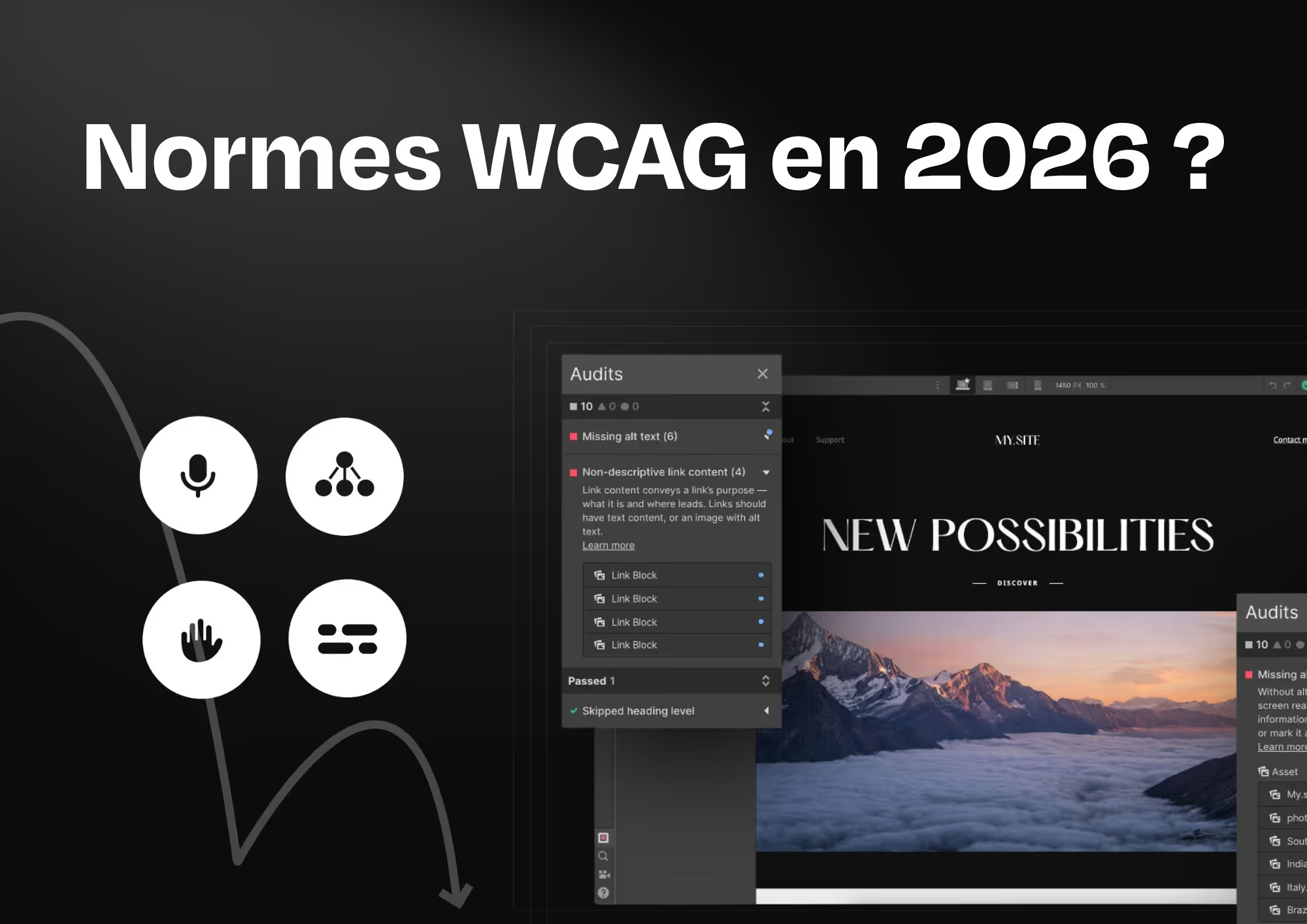
-> The Audit panel in the Designer detects the most common problems: images without alt, buttons without labels, empty links. It's a good safety net, not a comprehensive audit tool.
-> Vision Preview simulates various types of visual impairment: red-green color blindness, blue-yellow color blindness, achromatopsia, blurred vision. You see the site as some users actually see it.
-> Text Zoom Preview Check that the layout fits when the text is magnified to 200%. This is a direct requirement of WCAG, and a lot of sites break it with hidden overflows or grids that are too rigid.
-> The custom ARIA attributes are added directly into the element settings, without touching the code. For components like tabs, accordion, or modals, it's essential.
-> The HTML semantic structure can be controlled from the Designer. Choosing the right tag (H1, H2, nav, main, footer...) is done without writing a single line of code.
An important point about ARIA: a WebAIM study shows that pages with poorly implemented ARIA attributes have an average of 34% more errors compared to pages without ARIA. It is not a detail. A careful implementation is better than a haphazard one.
The checklist that we apply to our projects
These are the points checked systematically before being put online.
Structure and semantics
- Declared language (html lang="fr” or “en”)
- One H1 per page, consistent hierarchy up to H6
- Semantic tags used: nav, main, header, footer, aside
- Unique and descriptive page title for each URL
Images and media
- Each informative image has a descriptive and useful alt.
- Decorative images have alt= "” or aria-hidden="true”
- The videos have subtitles or a transcript
Navigation
- Full keyboard navigation tested (Tab, Shift+Tab, Enter, Escape)
- Focus visible at all times, not hidden by the sticky header
- “Go to main content” link at the top of the page
- Descriptive link text, never “click here”
Forms
- Each field has a label associated correctly
- Explicit and accessible error messages
- No CAPTCHA without an alternative
Design and contrast
- Minimum text/background contrast of 4.5:1 for body text
- Information is never conveyed through color alone
- Clickable areas of at least 24x24 px (WCAG 2.2 requirement)
- No automatic animation without user control
Code and ARIA
- Valid and semantic HTML
- ARIA attributes used sparingly and correctly
- Custom interactive components have the appropriate roles
Accessibility and SEO follow the same logic
Google reads a website the same way a screen reader does. It follows the HTML structure, analyzes alt text, checks navigability, and reads labels. An accessible site is a site that Google understands better.
Alt tags fuel image SEO. The heading hierarchy structures content for crawlers. Descriptive links improve the indexing of the pages they point to. Clean HTML improves Core Web Vitals. This is no coincidence; it is the same rigor applied to both disciplines simultaneously.
Studies show that sites that invest in accessibility see an average 20% increase in their overall conversion rates. Not because accessibility is magic, but because an accessible site is generally better structured, more readable, and easier for everyone to use.
Key takeaways
Web accessibility is not just for large corporations or public organizations. Since June 2025, it applies to private companies with a website, online store, or digital service.
WCAG 2.2 Level AA is the gold standard. It covers content structure, navigation, contrast, forms, media, and interactive components. Webflow makes it possible to reach this level without leaving the no-code environment, provided you work correctly from the design stage.
Two things to avoid at all costs: addressing accessibility at the end of the project and relying on accessibility overlays. These widgets that claim to make a site compliant in one click are not proof of legal compliance. The W3C itself has questioned them. Accessibility is built into the code, not applied to the surface.
The best time to start was six months ago. The second best time is now.
Resources on the subject
W3C WAI : the official WCAG documentation, available in French since June 2025.
Access42 : the French-speaking authority on digital accessibility. They coordinated the official French translation of WCAG 2.2.
Belgian Web Accessibility : the official Belgian portal, featuring local requirements and compliance resources.
WebAIM : annual analyses on the state of web accessibility, including data and case studies.
Webflow Accessibility : the official Webflow documentation on accessibility tools integrated into the Designer.
RGAA : the French reference framework based on the WCAG, useful for projects within France.
These businesses have migrated to Webflow
And their marketing teams thank us for it.