Charlie Bouvier

Account Executive
June 9, 2026
Summary of the article
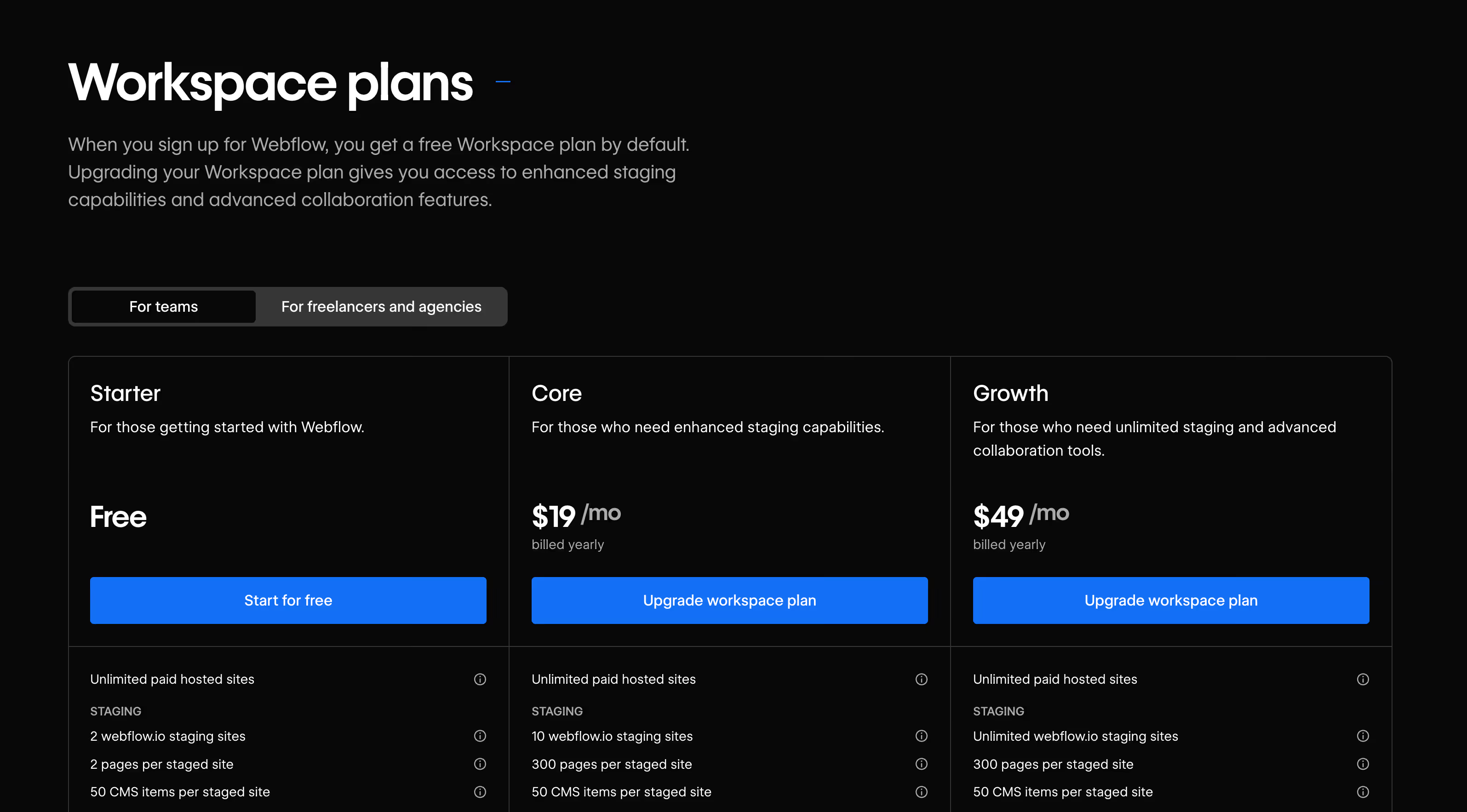
Workspace plans and Site plans correspond to two distinct billing levels in Webflow. A Workspace package covers your team: the number of collaborators, the number of staging projects that you can manage and the functionalities available (code export, real-time editing, guest roles, etc.).
A Site plan covers a published website: hosting, bandwidth, CMS limits, form submissions, and e-commerce features.
Workspace plans are billed per workspace, while Site plans are billed per site. They can coexist within the same Workspace, but respond to completely different uses.
For agencies, the rule is simple:
Workspace = team infrastructure cost
Site = customer hosting cost

Summarize with AI
Workspace plans and Site plans are two distinct billing levels in Webflow, and you often need both.
Workspace plans manage your team and projects, while Site plans cover hosting and resources for a specific site.
1. What are Workspace plans for
Workspace plans are linked to your account and team, not to a single website.
They mainly determine:
- The number of people who can collaborate in your Webflow account (positions, permissions, guest access).
- The number of non-hosted projects you can create and manage in Staging.
- Access to advanced team features, such as roles and permissions, code export, feedback, and real-time collaboration.
In terms of billing:
- You pay per user (or Seat) within the Workspace.
- Workspace plans do not include hosting: hosting is covered by a Site plan.
- The same Workspace can contain several projects — some hosted (with Site plans) and others simply by Staging.
Workspaces are particularly suitable for agencies, freelancers working for multiple clients, and internal teams managing multiple sites in parallel.
2. What are Site plans for
Site plans are associated with only one site at a time.
They determine:
- Whether the site can be published on a custom domain.
- Technical limitations: bandwidth, traffic, number of CMS elements, form submissions, and backups.
- Access to e-commerce features if you select an e-Commerce plan.
In terms of billing:
- You pay per site, for each active Site plan.
- Site plan billing is independent of Workspace billing, although both appear on the same billing entity (Workspace).
- A Workspace can combine and manage multiple Site plans at the same time.
If your goal is simply to publish a single site on a custom domain, a Site plan alone (combined with a free Workspace) may suffice.

3. Key billing differences
What you pay for:
- Workspace plan: collaboration features, number of users, and projects in Staging.
- Site plan: the hosting and resources of a published website.
How billing evolves:
- Workspace: evolves with the size of your team (more users = higher cost).
- Site plan: evolves according to the number of sites online and the level of resources chosen.
Typical cases:
- Single project/single site → mainly a Site plan, with possibly a paid Workspace if you need more features or projects in Staging.
- Agency or studio → a paid Workspace (often “Freelancer” or “Agency”) + several Site plans for client sites.
In summary:
Workspace plans cover people and projects, while Site plans cover every online website.
These businesses have migrated to Webflow
And their marketing teams thank us for it.