Charlie Bouvier

Account Executive
June 9, 2026
Summary of the article
Whenever you change a Webflow plan mid-cycle — whether upgrading, downgrading, or switching from monthly to yearly — Webflow calculates the unused days on your current plan and either charges or credits you the difference. Upgrades result in a prorated charge for the remaining days at the new higher price. Downgrades result in a prorated credit added to your workspace balance, which offsets future invoices. Switching from monthly to yearly triggers an immediate annual charge minus a credit for the unused month. Switching from yearly to monthly generates a large credit for the unused months of your annual payment, which can cover several months of future monthly bills. All proration line items are clearly labeled on your invoices and visible in advance in the Next Bill Summary.

Summarize with AI
Webflow uses Proration To make sure you only pay for what you actually use when you upgrade, downgrade, or switch billing frequencies mid‑cycle. Instead of waiting until the end of your current billing period, Webflow calculates partial charges and credits immediately and applies them to your next invoice.
1. What proration means in Webflow
Proration is the process of adjusting your bill based on How much time is left In your current billing cycle when you make a change.
When you:
- Upgrade A plan (e.g. from Core to Growth Workspace, or from Basic to CMS Site plan), Webflow charges you for the Remaining Days Of the new, higher-priced plan.
- Downgrade A plan, Webflow credits you for the Unused Days Of the old, higher-priced plan.
- Switch billing frequency (monthly ↔ yearly), Webflow calculates what you've already paid and what you owe on the new cycle, then issues a charge or credit balance.
This ensures you're never double‑charged and you don't lose money when making changes.
2. How Proration Works When You Upgrade
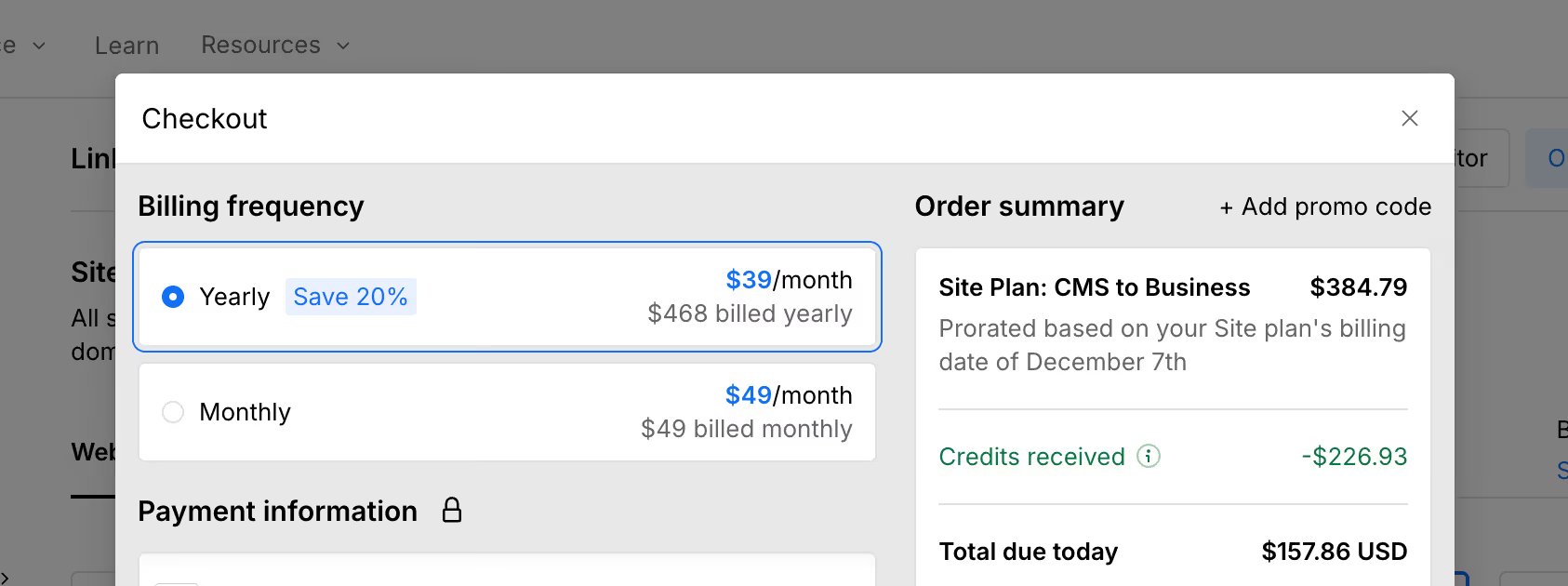
Let's say you're on a Monthly CMS Site Plan at $29/month, and halfway through the month you upgrade to a Business Site Plan at $49/month.
Here's what happens:
- Webflow calculates how many days are left in your current monthly cycle (e.g. 15 days).
- It Charges You The Prorated Difference Between the Two Plans for Those 15 Days.
- The Prorated Charge Appears On Your Next Invoice, not immediately.
- From the next full billing cycle onward, you'll pay the full $49/month.
Math example:
- Old plan: $29/month ≈ $0.97/day
- New plan: $49/month ≈ $1.63/day
- Difference: $0.66/day × 15 days = $9.90 prorated charge
3. How Proration Works When You Downgrade
If You Downgrade From A Business Site Plan ($49/month) to a Basic Site map ($14/month) halfway through the month:
- Webflow calculates the value of the Unused Days On the old plan.
- It issues a Prorated credit For those days.
- The Credit Appears On Your Next Invoice, reducing what you owe.
- From the next cycle onward, you'll be billed $14/month.
Math example:
- Old plan: $49/month ≈ $1.63/day
- New plan: $14/month ≈ $0.47/day
- Difference: $1.16/day × 15 days = $17.40 prorated credit
This credit can offset future charges, or if your account balance becomes positive, Webflow may allow you to apply it to other subscriptions in the same Workspace.
4. Proration when switching from monthly to yearly (or vice versa)
Switching billing frequencies is a bit more complex because the pricing and cycle length both change.
Monthly → Yearly:
- Webflow calculates how much you've already paid for the current month.
- It Then Charges You For A Full Year at the yearly rate (which is usually discounted vs 12 months of monthly billing).
- It applies a Credit for the unused portion of your current monthly cycle.
- The net charge (yearly price minus monthly credit) appears on your next invoice.
Yearly → Monthly:
- Webflow calculates how much of your yearly subscription you've already used (in days).
- It Credits You For The Unused portion Of the year.
- It then starts billing you monthly going forward.
- The credit is applied to your next invoice (s) until it's fully used.
Important: Switching from yearly to monthly often results in a Large credit because yearly plans are discounted. That credit will reduce or eliminate your monthly bills until it's exhausted.
5. How to See Proration on Your Invoice
Prorated charges and credits appear as Separate Line Items On your invoice, usually labeled something like:
- “Proration for Plan Change: Site Plan Upgrade”
- “Credit for unused time: Workspace plan downgrade”
To review them before they hit your card:
- Go to Workspace settings → Billing (left menu)
- Open the Next Bill Summary.
- Look for line items labeled “Proration” or “Credit” alongside your regular subscription charges.
This gives you full visibility into what you'll be charged (or credited) before the billing date.

6. What Proration Does NOT Cover
Proration applies to Plan Changes, but there are a few exceptions:
- Refunds for cancellations: If you cancel a plan entirely, Webflow does Not Automatically refund the unused portion. You may need to request a refund manually (see”How to request a refund on your Webflow subscription“).
- Mid-cycle purchased add‑ons: Some add‑ons are prorated, others may be billed in full depending on the product. Check the add‑on details or contact Support if unclear.
- Seat additions: Adding a new Workspace seat mid‑cycle is usually prorated for the remaining days, but removing a seat only takes effect at the End of the current billing cycle (no immediate credit).
7. Common Proration Scenarios for Agencies
Scenario 1: Customers approve a higher site plan mid‑month
You upgrade the site from CMS to Business. Webflow prorates the upgrade charge, and you can pass that prorated amount to your customer via your own invoice or Client Payments.
Scenario 2: You downgrade a Workspace plan at the end of a project
You get a prorated credit for the unused days, which reduces your next workspace bill. This is especially useful if you're scaling down after a busy season.
Scenario 3: Switching from monthly to yearly for savings
You decide to pay yearly to get the discount. Webflow credits your current monthly payment and charges you the full yearly amount minus that credit, so you lock in the annual savings immediately.
These businesses have migrated to Webflow
And their marketing teams thank us for it.