What is Notion?
Notion is a collaborative workspace that allows you to centralize documents, databases, wikis and project management in a single interface.
The tool is based on modular pages that can be structured with blocks (text, tables, databases, kanban tables, timelines, etc.).
This approach makes it a real Swiss Army knife for organizing the information and internal processes of a team.
Notion brings together wiki, documentation, databases, and project management in a single modular environment.
Key features for B2B teams
- Pages and sub-pages to document processes, guides, roadmaps and reports.
- Databases viewed in grid, kanban, calendar, timeline or gallery.
- Relationship between databases to link projects, tasks, tasks, customers, content or sprints.
- Comments, mentions and final sharing of rights to collaborate with the team or partners.
- Built-in AI capabilities to summarize, rewrite, or generate content directly within pages.
Notion often becomes the central source of truth for project documentation and monitoring.
For whom and in what contexts?
Notion is suitable for teams that want a single workspace to replace a mix of scattered documents, wikis, and spreadsheets.
It is particularly suitable for agencies, product teams, marketing, and management teams that need to share the same structured information.
- Agencies and studios that document their standards, processes and client projects.
- Product teams that organize roadmaps, specs, feedback, and technical documentation.
- Marketing teams that centralize campaign plans, content, briefs, and results.
Notion is relevant as soon as there is a need to centralize information and make it navigable by the whole team.
Notion Prize
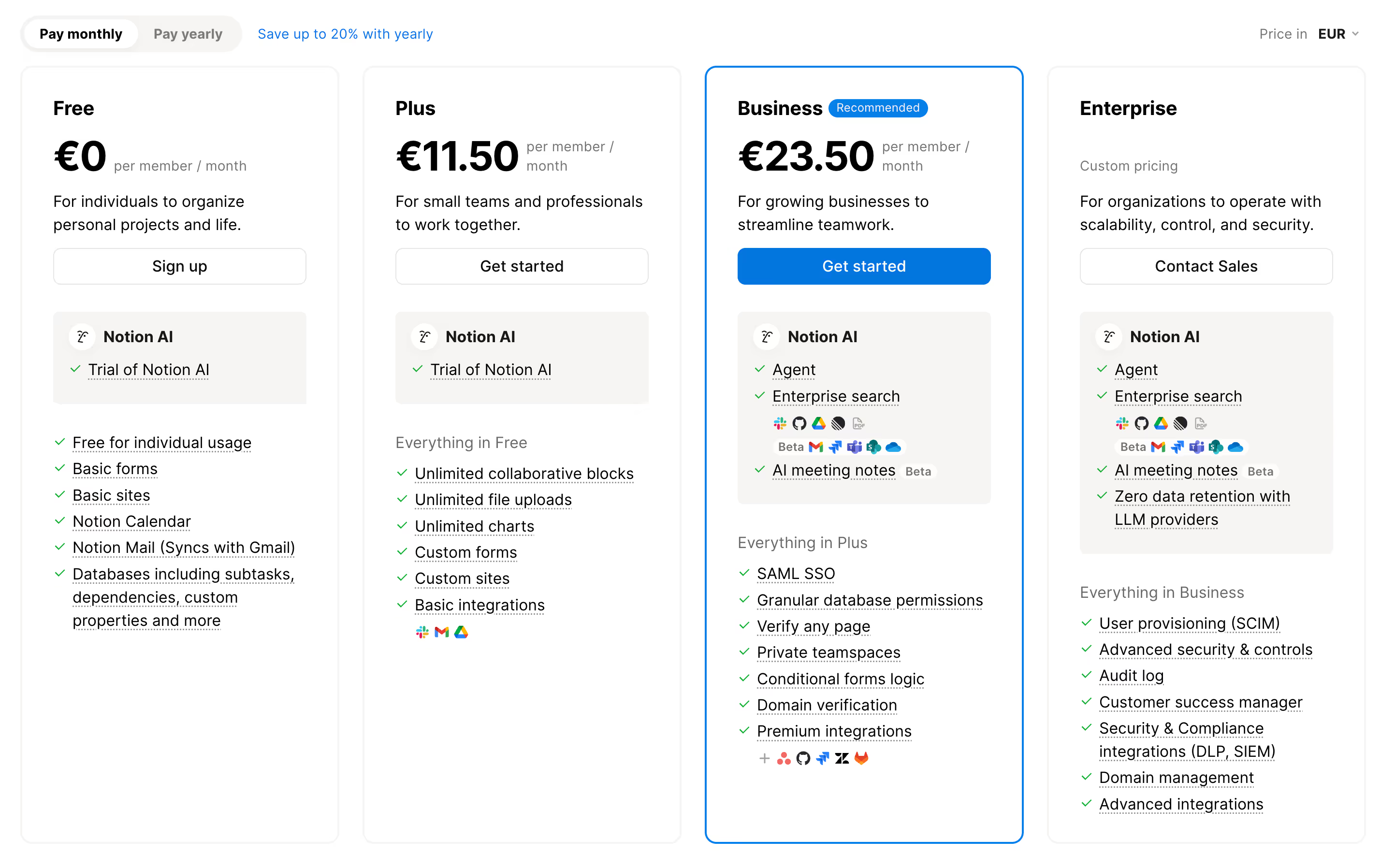
Notion's pricing is based on the number of members and the level of collaborative features included in each plan. The offerings are structured into Free, Plus, Business, and Enterprise plans, with an upgrade based on teamwork, security, and governance needs.
- Plan Free: designed for individual use or very small teams, with a basic workspace, limited collaborative blocks, and essential features for organizing projects and notes.
- Plan Plus: designed for small teams, with unlimited collaborative blocks, unlimited file uploads, basic integrations, and more layout options and views.
- Business Plan: aimed at growing businesses, with granular database permissions, private team spaces, premium integrations, SAML SSO, and advanced features around Notion AI.
- Enterprise Plan: personalized offer for organizations with high control and security challenges, including user provisioning (SCIM), audit logs, security/compliance integrations and dedicated support.
Notion remains accessible to start on the Free or Plus plan, then leaves the possibility of evolving to Business or Enterprise when collaboration, security and governance needs become structural.
We-R agency review on Notion
Notion is particularly interesting for structuring knowledge around a Webflow site or a digital strategy.
It is becoming an excellent hub for documenting information architecture, content guidelines, project monitoring and feedback.
- Centralize the briefs, content and guidelines used on a site or in campaigns.
- Track projects, customer requests and priorities all in one place.
- Serve as a documentary base for marketing and product teams.
On the other hand, Notion shows its limits as soon as very advanced business logic or complex relationships are necessary.
Notion is a very good support for documentation and coordination, provided you accept its generalist side.
Alternatives and tools similar to Notion
Several tools are positioned close to Notion.
- Confluence: more focused on corporate documentation, with a more rigid structure.
- ClickUp/Asana: more focused on project management than on deep documentation.
- Airtable: better when it comes to manipulating mainly structured data rather than documents.
Compared to the alternatives, Notion stands out for its flexibility and for the fusion of documentation + databases.