What is Zapier?
Zapier is a no-code automation platform that allows applications to be connected to each other to automatically execute repetitive tasks.
Automations, called “Zaps”, are built around a trigger and one or more actions executed in other tools.
Zapier thus acts as a glue layer between thousands of applications, without requiring specific development.
Zapier works on a simple principle: “When this happens in one app, do it in another app.”
Key features for B2B teams
- Single or multi-step zaps: sequence of several actions from the same event (e.g. new lead → create a CRM contact → send an email → notify on Slack).
- Ready-to-use connectors for thousands of tools: CRM, emails, forms, file management, support, e-commerce, etc.
- Filters, delays, and conditional paths (“Paths”) to add business logic without coding.
- Built-in data transformation tools (Formatter) to clean, cut, or reformat information before sending it to another app.
- Recent AI features: content generation and processing, agents integrated into Zaps, and assistant for building workflows.
-
Zapier stands out for its huge library of integrations and its ability to create automations that are simple to set up and easy to maintain.
For whom and in what contexts?
Zapier is primarily aimed at small teams, freelancers, agencies and SMEs who want to save time on repetitive tasks between cloud tools without mobilizing developers.
It is particularly suited to contexts where workflows remain relatively linear and where the priority is speed of implementation rather than technical complexity.
- Synchronize Webflow or Typeform forms with a CRM, an emailing list or a database.
- Automate notifications (Slack, email) when a new lead, ticket, or payment is created.
- Update spreadsheets or dashboards based on marketing, sales, or support events.
-
Zapier is particularly relevant for daily automations between SaaS apps, where simplicity takes precedence over the sophistication of scenarios.
Zapier price
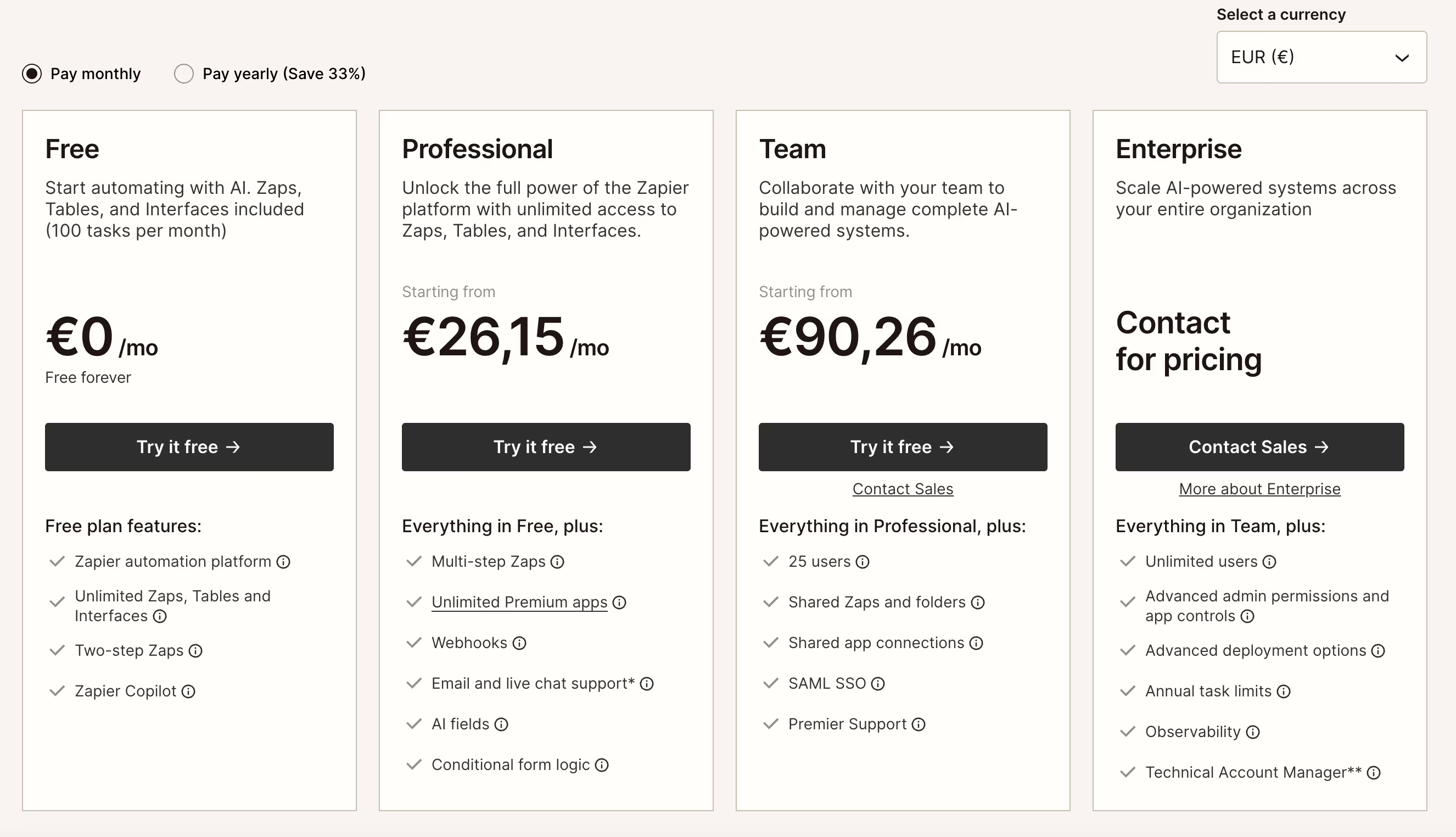
Zapier charges based on Number of tasks completed each month (each action in a Zap consumes one task) and the level of features included in each plan. The current grid is structured around a Free plan, a Professional plan, a Team plan and a tailor-made Enterprise offer.
- Free plan: limited to a small volume of monthly tasks, with access to the automation platform, simple Zaps and some basic functionalities, suitable to get started.
- Professional Plan: provides access to a significantly higher number of tasks, multi-step Zaps, webhooks, premium apps, and advanced options (conditional logic, enhanced support).
- Team Plan: designed for teams, with more users, shared Zaps, app connections, and role and security management features (SSO, advanced controls).
- Enterprise Plan: customized offer for organizations that automate critical systems, with extended limits, advanced permissions and controls, deployment options, observability, and dedicated technical support.
Zapier is still very accessible to start with modest volumes of tasks, but the cost increases rapidly if many workflows are running continuously or if the team needs higher plans.
We-R agency review on Zapier
Zapier remains a very good gateway to automation for marketing and ops teams who do not yet have a no-code or data culture.
Its simple interface, its ready-to-use templates and the wealth of its integrations allow you to quickly unlock significant time savings.
- Create simple automations around Webflow forms (creation of contacts, notifications, addition to an emailing sequence).
- Connect Webflow to tools that do not offer direct native integrations, via existing Zapier connectors.
- Quickly test a workflow before eventually migrating it to a more advanced solution if needs become more complex.
The main limitation: as soon as workflows become numerous or very active, the cost per task and certain technical constraints (very complex scenarios, detailed error management) can lead to the consideration of more powerful tools such as Make or n8n.
Zapier is ideal for getting started and covering a large part of simple automation needs, but shows its limits as soon as volumes and complexity increase.
Alternatives and tools similar to Zapier
Several tools can complement or replace Zapier depending on the level of control and complexity sought.
- Make: more suitable for complex workflows and very visual scenarios, with an operating model that is often more flexible on high volumes.
- n8n: a more technical open source solution, interesting for organizations that want to self-host and keep control of their automation infrastructure.
- Open source or low-cost alternatives: useful for contexts where Zapier's cost per task becomes a barrier.
Compared to Make or n8n, Zapier clearly favors simplicity and speed of implementation rather than technical depth or fine cost control.