.svg)
What is Figma?
Figma is a collaborative interface design and prototyping platform used to design websites, applications, and digital products, accessible via browser or desktop application.
In a Webflow workflow, Figma comes into play before integration:
- UX and information architecture definition
- UI and component structuring
- Anticipation of responsive behaviors and interactions
- Validation of user flows before development
What truly sets Figma apart is its collaborative philosophy: designers, marketing teams, product managers, developers, and clients work in a single environment, in real time, without technical friction.
Figma has established itself as the reference tool for structuring UX/UI before Webflow integration.
Key features for B2B and Webflow teams
UI design and design systems
- Creation of responsive layouts using frames, auto-layout, components, and variables
- Implementation of reusable design systems (colors, typography, components, tokens)
- Consistent structuring of marketing pages prior to Webflow integration
Prototyping and user flow validation
- Interactive prototypes with transitions, overlays, and user flows
- Simulation of B2B funnels, pricing pages, onboarding flows, or SaaS journeys
- UX validation before investing time in development
Collaboration and workshops
- Real-time co-editing, contextual comments, and version history
- Use of FigJam for UX workshops, sitemaps, user journeys, and redesign framing
- Reduced back-and-forth between marketing, design, and development teams
Handoff to Webflow
- Dev Mode to inspect spacing, sizes, styles, and variables
- Export of clean assets for Webflow integration
- Improved fidelity between design and the final website
New features and AI
- AI-assisted features to speed up creation and iterations
- New products such as Figma Make or Figma Sites for exploratory phases
Who is Figma for, and in which contexts?
Figma is particularly suited for:
- B2B and SaaS marketing teams designing or redesigning a Webflow website
- Webflow agencies managing multiple projects and scalable design systems
- Product teams aiming to align UX, content, and implementation
It is less relevant for:
- Very simple projects
- Teams without a design culture, where the tool may be overkill
Figma delivers the most value as soon as design becomes a performance and consistency challenge.
Figma pricing (in euros)
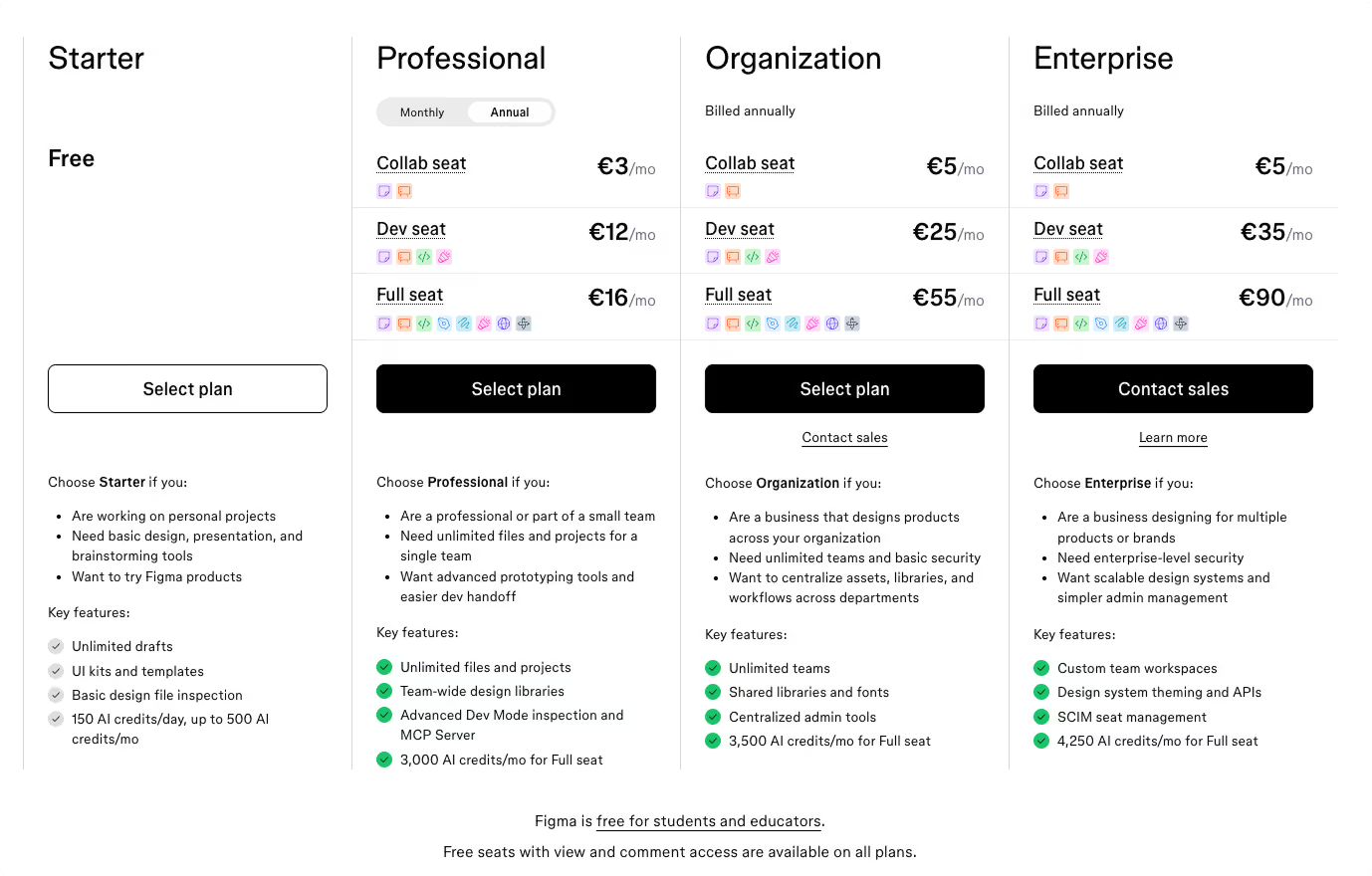
Figma operates on a freemium model, billed per “editor” user. The prices below are those displayed for Europe, excluding VAT.
- Starter / Free
Free. Suitable for testing or personal projects, but limited for teamwork and shared design systems. - Professional
Approximately €16 per editor per month (annual billing).
The most common plan for SMEs and agencies, offering unlimited files, advanced prototyping, and team libraries. - Organization
Approximately €55 per editor per month (annual billing).
Designed for structured teams with large-scale design systems, advanced administration, and SSO. - Enterprise
Approximately €90 per editor per month (annual billing).
Advanced governance, security, and fine-grained access control for large organizations.
For agencies and SMEs, costs mainly depend on the number of active designers, while clients and stakeholders can usually view or comment at no additional cost.
Figma becomes cost-effective when collaboration and design systems are fully leveraged.
We-R’s opinion on Figma
Figma is now an essential tool with no real equivalent in the collaborative interface design market.
In web development projects—especially in a Webflow context—structuring the UX/UI phase in Figma significantly improves decision quality, reduces friction between teams, and accelerates execution.
The platform offers a level of collaboration, sharing, and standardization that is currently unmatched by any serious alternative.
For marketing teams, product teams, and agencies aiming for a high level of quality, Figma has become a de facto standard.
Alternatives and similar tools to Figma
- Sketch : A former UI design standard on macOS. Today outdated: limited collaboration, a declining ecosystem, and poor alignment with modern team workflows. Innovation and updates lag far behind Figma.
- Adobe XD : A tool integrated into Creative Cloud but now barely maintained. Its future is uncertain, making it an unsuitable choice for new projects.
- Penpot : An interesting open-source alternative for budget or sovereignty constraints, but still behind in terms of advanced features, ecosystem maturity, and overall robustness.
At the moment, Figma has almost no serious competition in modern collaborative design.