What is Hotjar?
Hotjar is a UX analysis tool that visualizes user behavior through heatmaps, session recordings, and surveys.
It complements quantitative data by providing a qualitative vision of how visitors actually interact with a site.
Hotjar is widely used to optimize conversion rates and improve the usability of key pages.
Hotjar gives a concrete vision of the user experience on key pages.
Key features for B2B teams
- Click, scroll, and motion heatmaps
- Session recordings to review individual courses
- Surveys and in-page feedback to gather user feedback
- Funnels to analyze dropouts at each stage
- Segmentation of sessions by device, pages, or behaviors
Hotjar combines behavioral observation and the direct collection of user feedback.
For whom and in what contexts?
Hotjar is for marketing, product, and UX teams working on conversion optimization and continuous improvement of the user experience.
It is particularly useful on the key pages of a B2B site: home page, service pages, landing pages and forms.
- Identify why some forms or CTAs convert poorly
- Understand how visitors explore a new page
- Gather feedback during a redesign or an A/B test
Hotjar is a central tool for feeding a continuous CRO (conversion rate optimization) approach.
Hotjar price
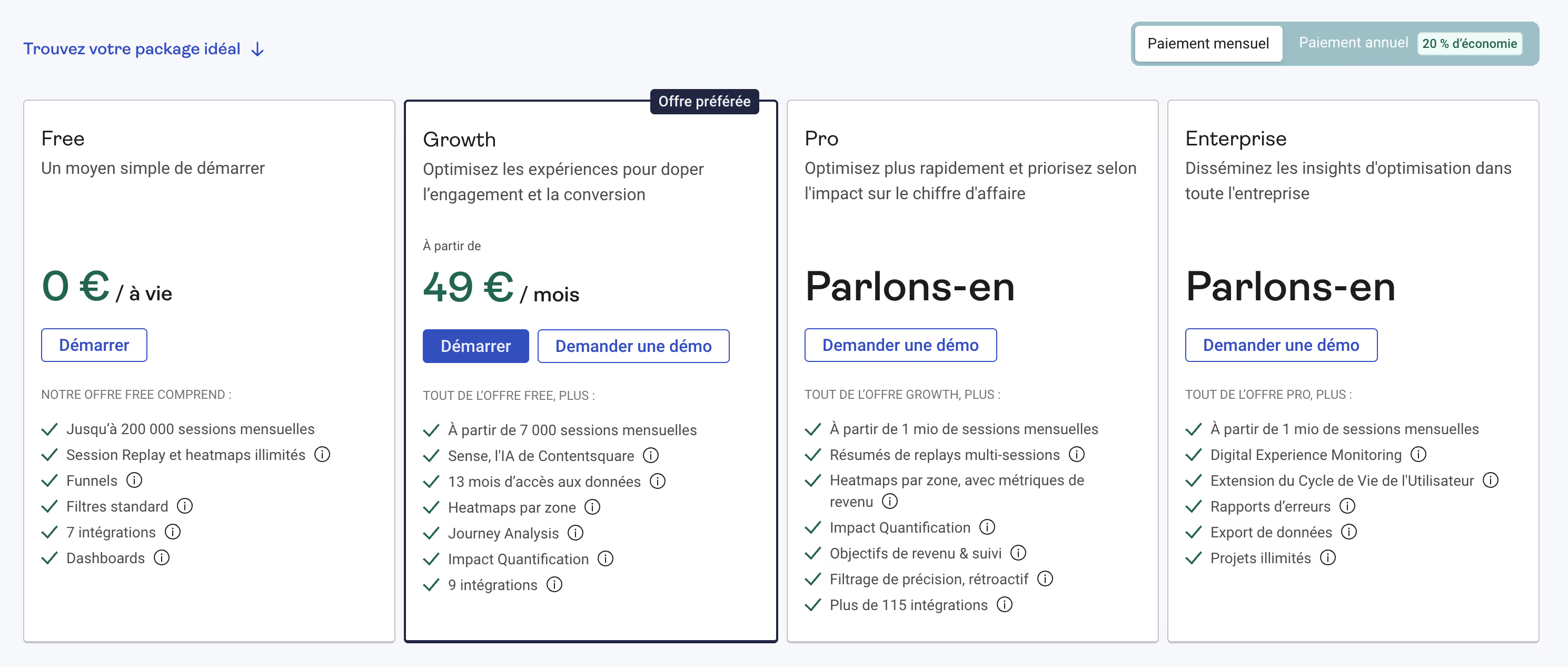
Hotjar offers a freemium model, with a Free plan and several paid plans that differ mainly in the Volume of monthly sessions, the wealth of analyses and the number of integrations available.
- Free: free for life, with a capped volume of monthly sessions, unlimited but basic session recordings and heatmaps, a few tunnels, standard filters, a small number of integrations, and simple dashboards.
- Growth: Starting with a certain volume of monthly sessions, add more historical data, zone heatmaps, features like Journey Analysis, Impact Quantification, and more integrations.
- Pro: for much higher volumes (starting from around 1 million monthly sessions), with multi-session replay summaries, heatmaps enriched with revenue metrics, revenue goals and tracking, advanced filters, and a large catalog of integrations.
- Enterprise: built on the basis of Pro, but sized for organizations that need more advanced monitoring (Digital Experience Monitoring, extension of the user life cycle, error reports, data export, unlimited projects, etc.).
Hotjar may remain affordable for small and medium-sized sites at the initial stages, but the cost increases with the volume of sessions, the need for history, and the depth of analytics deployed on all traffic.
We-R Hotjar review
For a B2B Webflow site, Hotjar is an excellent complement to Google Analytics to understand the obstacles to conversion.
It helps prioritize design, content, and CTA placement adjustments based on real behaviors.
- Analyze scrolls and clicks on pages, services or landing pages
- Observe the filling of forms to detect points of friction
- Launch targeted surveys to better understand visitor expectations
The trade-off: vigilance over performance, data confidentiality and the number of scripts loaded on the site.
Hotjar is a relevant investment as soon as conversion optimization becomes a strategic focus.
Alternatives and tools similar to Hotjar
Several alternatives exist depending on the maturity level and the budget:
- Microsoft Clarity: easier and free, but with fewer feedback features
- FullStory, Contentsquare: more advanced solutions for large accounts
- Other more specialized session recording tools
Compared to Clarity, Hotjar is distinguished by its integrated survey and user feedback modules.