What is Webflow Localize?
Webflow Localize (Webflow Localization) is the Webflow add-on for managing multiple languages and regions directly in the Designer, without using an external tool.
It allows you to create “locals” representing each language or regional variant, then to adapt content, styles, images and SEO for each of them while remaining in the Webflow interface.
Rather than a simple translation layer, Webflow Localize acts as a customization layer by market integrated into the heart of the site.
The power of Webflow Localize is not in the quality of the translation, but rather in the personalized experience it can offer to each specific region.
Webflow Localize transforms a Webflow project into a real multi-local site, managed from end to end in the Designer.
Key features for B2B teams
- Multiple locations: addition of languages or regional variants (e.g. fr-FR, fr-BE) with inheritance from the main locale and override possibilities per page or per element.
- Localization of CMS content and static pages: modification of texts, titles, CMS components and static content local by local.
- Localization of assets: images, alternative texts and certain assets can be adapted by market, especially when they contain text or local references.
- SEO localization: local management of meta titles, descriptions, Open Graph tags, hreflang and sub-directory URL structures to support international SEO.
- Visibility control: displaying or hiding elements according to the location in order to adapt messages, social proofs or offers to each market.
- Integrated machine translation: Webflow offers an initial machine translation, with the possibility of manual refinement directly in the Designer.
Webflow Localize goes beyond simple translation and allows you to adjust content, design and SEO according to each market.
For whom and in what contexts?
Webflow Localize is for companies that have already adopted Webflow as their main CMS and design tool and want to manage multilingual without multiplying tools.
It's especially suitable for marketing and product teams who want to maintain fine-grained control over every text and block, while remaining in a single environment.
- Multi-country B2B sites requiring the adaptation of arguments, social evidence and content according to the markets.
- Brands that want to maintain a consistent design while localizing certain content and assets.
- Webflow agencies that manage international customers and want to offer a 100% Webflow solution, without dependence on an external SaaS.
If you are looking for a translation solution only, I recommend an alternative solution (Weglot, Linguise) because the translation quality of Webflow Localize is not reliable on all languages. On the other hand, if you are looking to offer a personalized experience for each market, each region, Webflow Localize is the solution for you.
Webflow Localize Price
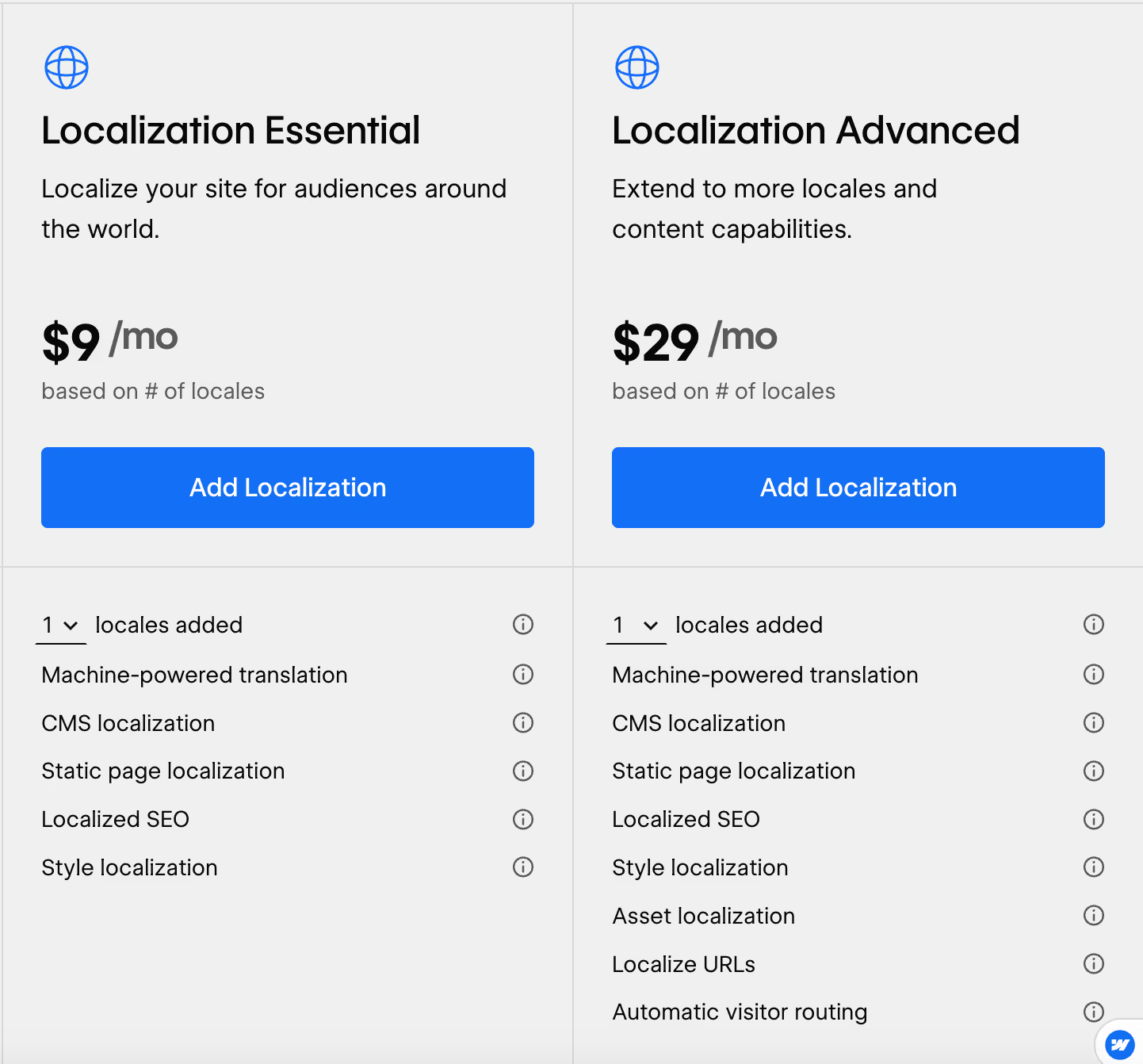
Webflow Localize works as an add-on that's billed per location, with multiple levels of plans that unlock more locations and features.
- Essential Plan: entry point adapted to small projects, with up to 3 locations, machine translation, localization of CMS and static pages, localized SEO and localized styles.
- Advanced plan: up to 10 locations, asset localization, URLs located in sub-directories, automatic routing of visitors to the right language and advanced features for growing sites.
- Enterprise plan: personalized offer with an adjustable number of locations, advanced management of the visibility of elements, drafts by location, integration with Webflow Enterprise offers and specific support.
The cost remains reasonable for a small number of locals, but increases rapidly when there are multiple markets and regional variants, which makes it necessary to prioritize strategic languages. If you only use the translation features, you will find cheaper elsewhere for better quality (alternative solutions listed below).
Webflow Localize is affordable for two or three locations, but billing by location requires real thought as soon as the strategy becomes multi-country on a large scale. But for real Localization needs and not just translation needs, the prices are consistent.
We-R reviews on Webflow Localize
In a Webflow context, Localize has the advantage of being integrated natively: everything is managed in the Designer, without external scripts, which simplifies maintenance for teams already trained in Webflow.
The ability to switch from one location to another in design or preview, to adjust texts, images and SEO in the same interface is a real gain in comfort in orchestrating several markets.
To make it simple:
- If you are only looking for a solution of translation, there is better. Weglot or Linguise depending on your needs (quality required and budget allocated), because the translation quality of Webflow Localize can be really bad for some languages.
- If you are looking to give a personalized experience to your visitors according to their location (beyond translation, adapting assets etc.), so Webflow Localize is really powerful and its cost is justified.
Webflow Localize is a great option when you want to exploit the full power of the add-on and not just the translation. If you choose this solution to translate your site for the convenience of native integration, prepare a few hours of work for proofreading.
Alternatives and tools similar to Webflow Localize
Several solutions can be considered as alternatives or complements to Webflow Localize to manage multilingual on Webflow.
- Weglot: a very successful SaaS solution for linguistic management (glossaries, rules, translation workflows), simple integration via script, but pricing highly indexed to the volume of words and languages.
- Linguise: proxy approach with competitive rates for large volumes of content, good quality AI translation and a dedicated interface, at the cost of a DNS configuration and a more technical validation workflow.
- Manual translations in the CMS: possible for small projects, but not very scalable as the number of pages and languages increases.
Compared to Weglot or Linguise, the real advantage of Webflow Localize is the fact that it is native to Webflow and therefore integrated into the Designer and its Localization features that go well beyond simple translation. For the rest, if we stick to translation, the quality does not allow total trust without verification, and makes the price too expensive for what it is.