What is ClickUp?
ClickUp is a project and task management platform that aims to replace several tools at the same time: task manager, collaborative docs, dashboards, time tracking and even team messaging.
The tool is built around a hierarchy workspace > spaces > folders > folders > lists > tasks, which each team can organize according to its own processes and working methods.
Its philosophy: centralize everything to avoid juggling several tools and gain operational clarity. Click here to try ClickUp for free
ClickUp is positioned as “the app that replaces all others”, a unique hub for managing projects, tasks, documents and team communication.
Key features for B2B teams
- 15+ project views (list, Kanban board, Gantt, calendar, table, mind map, workload...) to adapt the display to each context.
- Unlimited custom statuses and fields to set up the exact workflows for each team or department.
- Native automations to trigger actions (status change, assignment, notification) without code.
- Integrated docs to write guidelines, briefs and processes directly in the workspace, linked to projects.
- ClickUp Brain: Native AI that generates summaries, writes subtasks, suggests due dates, and answers on task content.
- Integrated time tracking and reporting dashboards to manage productivity and team load.
ClickUp stands out for its extreme level of customization and for the number of views available, even on lower plans.
For whom and in what contexts?
ClickUp is for teams that want a single tool to drive their entire organization, especially ops, marketing, product, and agency teams.
It is particularly suitable for structures that have complex workflows and that are willing to spend time configuring the tool to get the most out of it.
- Digital agencies and studios that manage several client projects in parallel with recurring processes.
- Marketing teams that coordinate campaigns, content, briefs, and reporting in a centralized space.
- Product teams that map out roadmaps, backlogs, sprints, and bugs in the same environment.
ClickUp is relevant for teams who are ready to invest in initial setup in exchange for a very flexible tool in the long term.
ClickUp Price
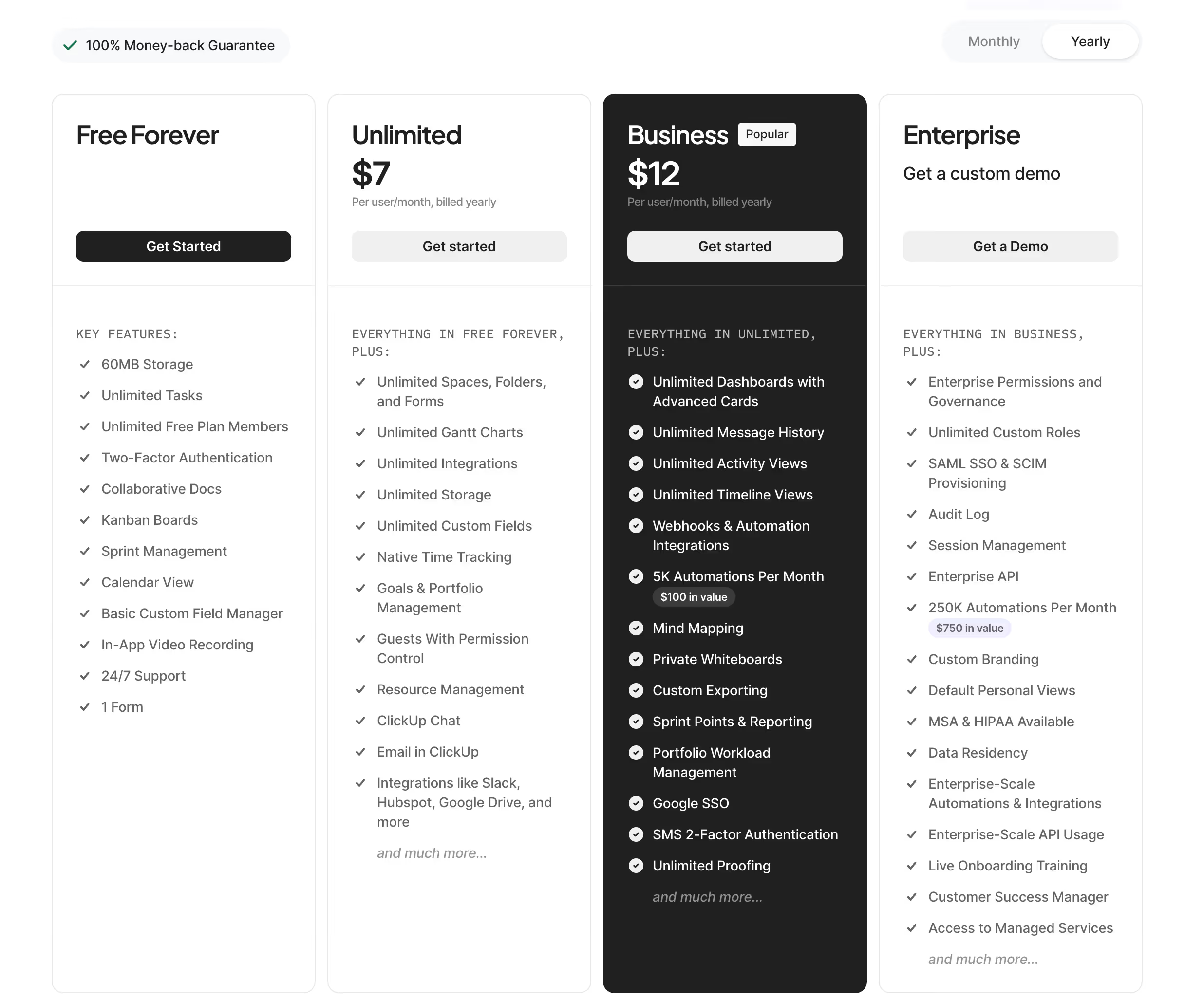
ClickUp offers per-user pricing with several levels, ranging from a very generous Free plan to an Enterprise plan. The plans stand out for the volume of automations, advanced features, and access to ClickUp Brain.
- Free plan: unlimited tasks and members, access to main views and basic features. Ideal to start without commitment.
- Unlimited plan ($7/user/month): unlimited dashboards, reports, integrations, and storage for small teams.
- Business plan ($12/user/month): advanced automations, workload management, advanced reporting options, and unlimited sub-tasks.
- Enterprise plan: customized pricing, SSO, granular permissions, dedicated support and supported onboarding.
In terms of price, ClickUp is often the most advantageous solution compared to Asana or Monday.com, which have comparable functionalities.
We-R review on ClickUp
ClickUp is the tool we recommend to teams who want centralize their entire operational organization without multiplying subscriptions.
It requires real time to get started, especially when it comes to structuring spaces and workflows. But once properly configured, the level of flexibility is above its competitors in my opinion.
At We-R, we used Notion for a long time to manage to-dos and projects, in addition to Airtable for the customer portal. We switched to ClickUp a few months ago, and honestly, the time investment at the start is well worth it.
Today, everything is centralized on the platform, and that is what makes it strong. If these issues speak to you, click here to register.
On the other hand, I think that ClickUp only makes sense after a certain level of maturity. For a small structure or a startup, a tool like Notion is more than enough. But as soon as the company grows, with processes in place, documentation, profitability monitoring, a ticket system... now, a more robust solution like ClickUp becomes almost indispensable.
Concretely, it allows you to:
- Structure spaces by customer or department, with tailor-made statuses adapted to each workflow
- Centralize briefs, tasks, and documents in one place, without having to juggle multiple tools
- Automate recurring tasks (follow-ups, reminders, status changes) and save valuable time every week
However, note: ClickUp can quickly become intimidating for teams that are not used to project management tools. Its learning curve is clearly more demanding than Monday.com or Asana.
ClickUp is a great choice for structured teams looking for power and flexibility, as long as they agree to an initial setup phase.
Alternatives and tools similar to ClickUp
Several tools are positioned directly against ClickUp on the project management market.
- Asana : cleaner interface and faster handling, but less customization and higher price on advanced plans.
- Monday.com : very visual and easy to adopt for non-technical teams, but with a lower feature/price ratio.
- Notion : excellent for documentation and shared knowledge, less optimized for structured task tracking and complex workflows.
Compared to its alternatives, ClickUp stands out for its flexibility and its feature/price ratio, despite higher onboarding complexity.