What is Monday.com?
Monday.com is a work management platform that places visual simplicity at the center of the experience: each project, task, or workflow is represented in the form of colorful and customizable tables.
The tool is designed to be adopted by non-technical teams without long training, without complex configuration, while offering solid automations and integrations.
Its strength: making project management accessible to the entire organization, not only to project managers.
Monday.com focuses on maximum adoption: an interface that everyone understands in a few minutes, even without a background in project management.
Key features for B2B teams
- Highly customizable boards with custom columns (status, date, text, formula, dependency, link...).
- Multiple views: Gantt, Kanban, calendar, calendar, workload, and forms to adapt the display to each team.
- Visual automations to trigger notifications, change statuses, or assign tasks according to simple rules.
- Dashboards (dashboards) aggregating progress, loads and indicators from several boards.
- AI Sidekick: built-in AI assistant to write updates, summarize discussions, or generate content directly within the platform.
- 200+ native integrations: Slack, HubSpot, Salesforce, Salesforce, Google Drive, Jira, Zoom, etc.
Monday.com shines by the speed of adoption and the readability of its tables. No other tool puts so many non-technical teams at ease so quickly.
For whom and in what contexts?
Monday.com is for growing teams (10 to 200 people) who need a tool that is flexible, visual, and easy to deploy across the organization.
It is particularly suited to environments where several departments need to collaborate using the same tool, without prior technical expertise.
- SMEs and cross-functional teams that want a single place to manage projects, requests and priorities.
- Sales and marketing teams that track pipelines, campaigns, and launches with shared visual boards.
- Operational departments that need consolidated dashboards to manage several teams from a single view.
Monday.com is ideal when adoption by the entire organization is the main issue, not just technical teams or project managers.
Monday.com Price
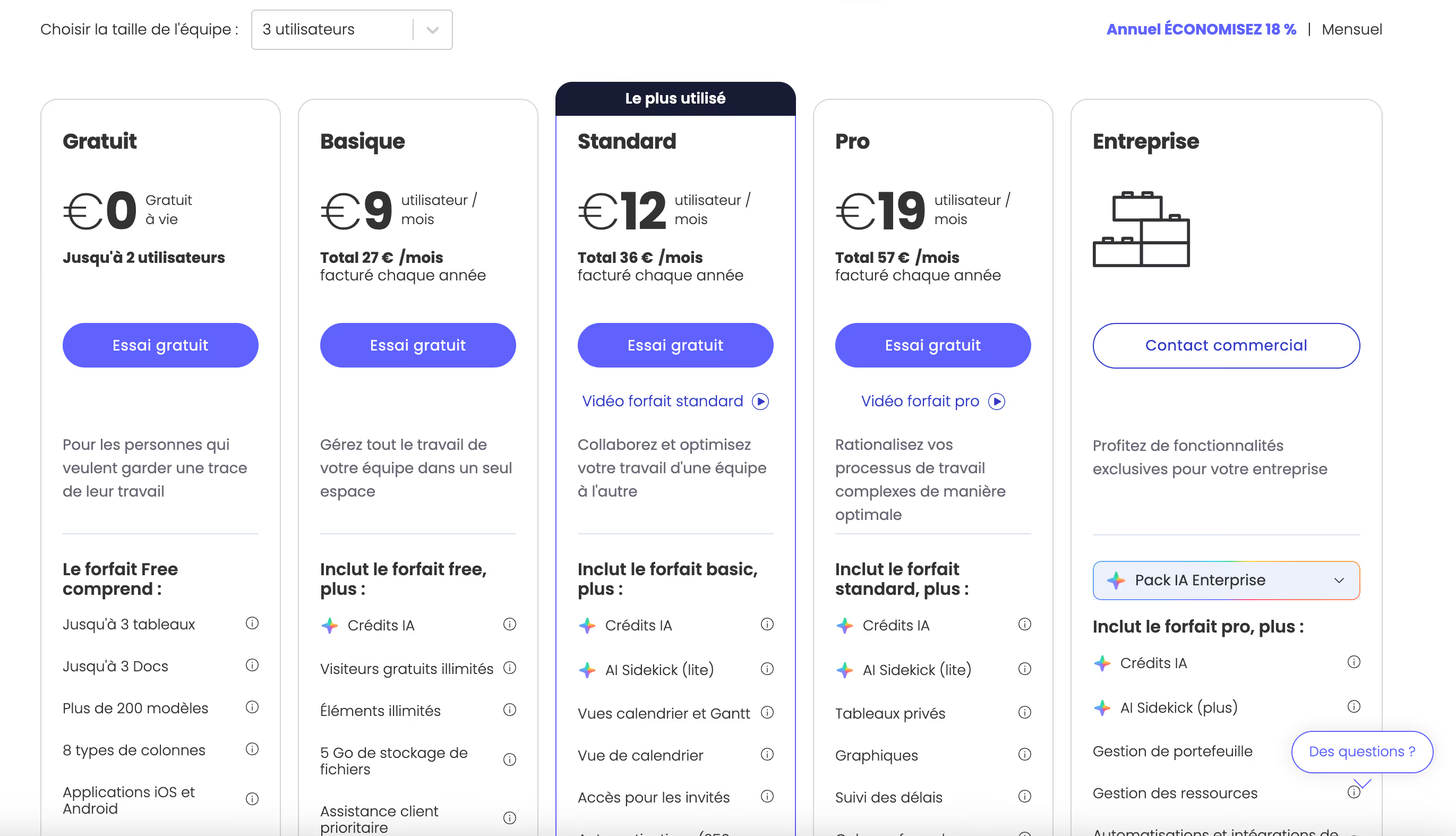
Monday.com offers per-user pricing, with a minimum of 3 seats on paid plans. The plans are distinguished by the volume of automations, access to dashboards, and security options.
- Free plan: up to 2 users, 3 boards and basic features. Very limited for team use.
- Basic plan (€9/user/month): unlimited items, 5 GB of storage, essential views and a simple dashboard.
- Standard Plan (€12/user/month): timeline, Gantt, calendar, automations (250/month) and basic integrations.
- Pro Plan (€19/user/month): 25,000 automations/month, time tracking, advanced dashboards and private boards.
- Enterprise plan: customized pricing, advanced security, SSO and dedicated support.
Monday.com is more expensive than ClickUp with comparable features, but its higher adoption rate may justify the gap for organizations where widespread use is the priority.
We-R reviews on Monday.com
Monday.com is the tool we recommend when the main challenge is for everyone to really use it, not just ops profiles or project managers.
Its immediate handling and its visual templates allow you to launch projects in a few minutes, without special training.
- Deploy joint project monitoring for mixed teams (sales, marketing, ops) without friction during onboarding.
- Manage campaigns or launches with consolidated dashboards that are clear and updated in real time.
- Standardize recurring workflows with automations that are easy to configure.
On the other hand, Monday.com is reaching its limits compared to ClickUp for teams that need very fine customization, a large number of automations or a better feature/price ratio.
Monday.com is the best project management tool if widespread adoption is the priority, no other solution reduces onboarding friction as much.
Alternatives and tools similar to Monday.com
Several tools are positioned directly opposite Monday.com in the visual project management market.
- ClickUp : more powerful and more customizable, with a better feature/price ratio, but a longer learning curve.
- Asana : equivalent in ease of use, with a more rigorous approach to the structure of projects and tasks.
- Notion : more suitable for documentation and the centralization of knowledge than for structured project management.
Faced with its alternatives, Monday.com stands out for its accessibility and speed of adoption. It's the ideal tool for teams that want quick results without complex setups.