What is Google Workspace?
Google Workspace is Google's cloud productivity suite for businesses. It combines everyday tools in a single subscription: Gmail (professional email on your domain), Google Drive (cloud storage), Docs, Sheets, Slides (collaborative office suite), Google Meet (videoconference) and Google Calendar.
It all works in the browser, with no software to install. The files are stored in the cloud, accessible everywhere, and editable by several people in real time.
Since January 2025, Gemini, Google's AI, has been integrated into all Business and Enterprise plans at no additional cost. Find out the prices per user and the current promotions.
Google Workspace centralizes email, docs, storage, and video conferencing in a 100% cloud environment, designed for real-time collaboration.
Key features for B2B teams
- Professional Gmail with your domain name, shared boxes, advanced filters and unlimited archiving.
- Collaborative editing in real time on Docs, Sheets, and Slides: several people edit the same file simultaneously, with version history.
- Google Drive: shared cloud storage (from 30GB to 5TB depending on the plan), with fine permissions and smart search.
- Google Meet: HD video conferences, automatic meeting notes via Gemini, and cloud recording.
- Gemini integrated: AI assistant in Gmail (writing, summaries), Docs, Sheets, Drive and Meet to generate, analyze, and synthesize directly in the tools.
- Admin console centralizes user, rights, security, and device management for IT admins.
Real-time collaboration is the historical strength of Google Workspace: no other suite makes it as fluid and immediate.
For whom and in what contexts?
Google Workspace is for all organizations that want a cloud, collaborative and easy to deploy work environment without heavy IT infrastructure.
It is particularly suitable for startups, agencies, SMEs and distributed teams that work a lot remotely or asynchronously.
- Agencies and studios that co-edit briefs, proposals and deliverables with their clients or internally.
- Startups and scale-ups that want a complete digital infrastructure from day one, without initial IT investment.
- Marketing and sales teams that share docs, calendars, reporting sheets and project drives in a common space.
Google Workspace is relevant as soon as a team needs a common collaborative base: email, files, calendar and video, without installation or maintenance friction.
Google Workspace prices
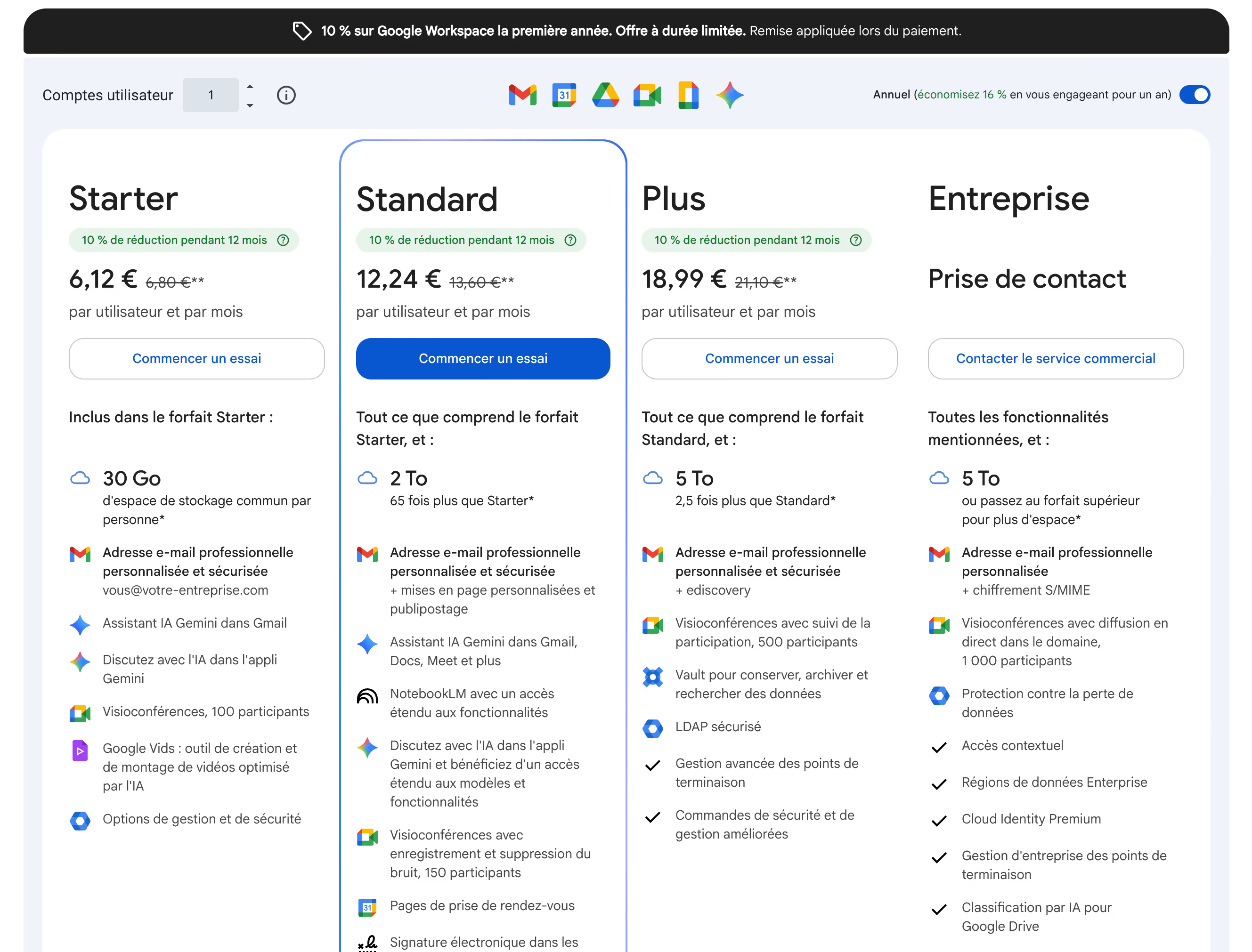
Google Workspace is billed per user per month, with 4 business plans. Since January 2025, rates have increased by 17-22%, and Gemini is included in all paid plans.
- Business Starter (€6.80/user/month): Gmail, Meet, Drive (30 GB pooled per user), Docs/Sheets/Slides suite and basic Gemini.
- Business Standard (€13.60/user/month): 2 TB of pooled storage, Meet recording, advanced Gemini, and additional security tools.
- Business Plus (€21.10/user/month): 5 TB of storage, eDiscovery, audit and advanced compliance checks.
- Enterprise: custom pricing, DLP, S/MIME, archiving and dedicated support.
For a small team of less than 10 people, the Business Starter plan offers great value for money, as long as you don't need desktop Office apps.
We-R review on Google Workspace
Google Workspace has been our go-to suite at We-R since the beginning. Its simplicity of deployment, its reliability and its real-time collaboration make it the ideal choice for an agency or a digit-first SME.
Integrating Gemini into all Business plans is a real added value in 2026: writing an email, summarizing a discussion thread or generating a first draft of a doc is done directly in the interface, without changing tools.
- Centralize all project files in a structured shared Drive, accessible by the entire team and the customers concerned.
- Manage emails, calendars, and Meet invites from a unified interface, without juggling tools.
- Use Gemini to speed up the writing of deliverables, reports, and business proposals.
The main limitation remains Google Sheets, which does not replace Excel for files with strong business logic or advanced macros. For these specific needs, Microsoft 365 keeps the advantage.
Google Workspace is the best starting point for a digit-first B2B team: efficient, collaborative, and integrating AI without additional friction. Find out the prices per user and the current promotions.
Alternatives and tools similar to Google Workspace
Two suites are positioned directly opposite Google Workspace on the market for corporate collaborative tools.
- Microsoft 365 : the reference for organizations already rooted in the Windows/Office ecosystem, with powerful desktop apps and highly advanced corporate security.
- Zoho Workplace : a budget-friendly alternative with a complete suite (email, docs, video, chat), particularly suited to small structures wishing to avoid the large Google or Microsoft ecosystems.
Compared to Microsoft 365, Google Workspace stands out for the simplicity of IT management, native real-time collaboration and AI integration at no additional cost.