What is Microsoft 365?
Microsoft 365 (formerly Office 365) is Microsoft's productivity suite that combines classic Office apps (Word, Excel, PowerPoint, Outlook) with cloud services: Teams for communication, OneDrive for storage, and SharePoint for document collaboration.
Unlike Google Workspace, Microsoft 365 offers desktop applications that can be installed on Mac and PC, making it the ideal suite for organizations that need to work offline or that use advanced Excel or Word features.
It is now the most deployed office suite in businesses around the world, with more than 400 million active users.
Microsoft 365 is the go-to for organizations that need powerful Office apps, robust enterprise security, and a well-integrated Windows ecosystem.
Key features for B2B teams
- Complete Office apps (Word, Excel, PowerPoint, Outlook) in desktop and web versions, with advanced features that Google Docs/Sheets don't always match.
- Microsoft Teams: messaging, calling, video conferencing, and shared work channels, with deep integration across the Microsoft ecosystem.
- OneDrive and SharePoint: cloud storage and document sharing with fine management of permissions and synchronization on devices.
- Enterprise security and compliance: Azure Active Directory, Intune (MDM), Microsoft Defender, Conditional Access, and compliance tools (HIPAA, GDPR).
- Copilot (Microsoft AI): available in Word, Excel, Outlook, and Teams to generate content, summarize, and automate, but sold as an add-on for most plans.
- More than 1,100 new features announced in 2026, including the integration of security and Copilot into the basic plans.
Microsoft 365 is unbeatable when it comes to the power of Office apps, enterprise security, and device management. It is the default choice for large organizations.
For whom and in what contexts?
Microsoft 365 is for organizations that already use the Windows/Office ecosystem or have strong security, compliance, and device management needs.
It is particularly suitable for SMEs and large companies in regulated sectors (finance, health, industry) or for organizations with user profiles that need Excel or Word in desktop version.
- Large companies and institutions that have already standardized on the Windows and Active Directory environment.
- Regulated sectors (finance, health, legal) that have very strict compliance and data management requirements.
- Teams that regularly work offline or that rely on advanced Excel features (macros, Power Query, Power BI).
Microsoft 365 is the natural choice for organizations that are already embedded in the Microsoft ecosystem. Changing would be expensive and risky with no clear benefit.
Microsoft 365 price
Microsoft 365 is billed per user per month, with multiple business plans. A price increase is expected in July 2026, by 5 to 33% according to plans. Full access to Copilot (IA) is still a paid add-on on most plans, unlike Google Workspace where Gemini is included.
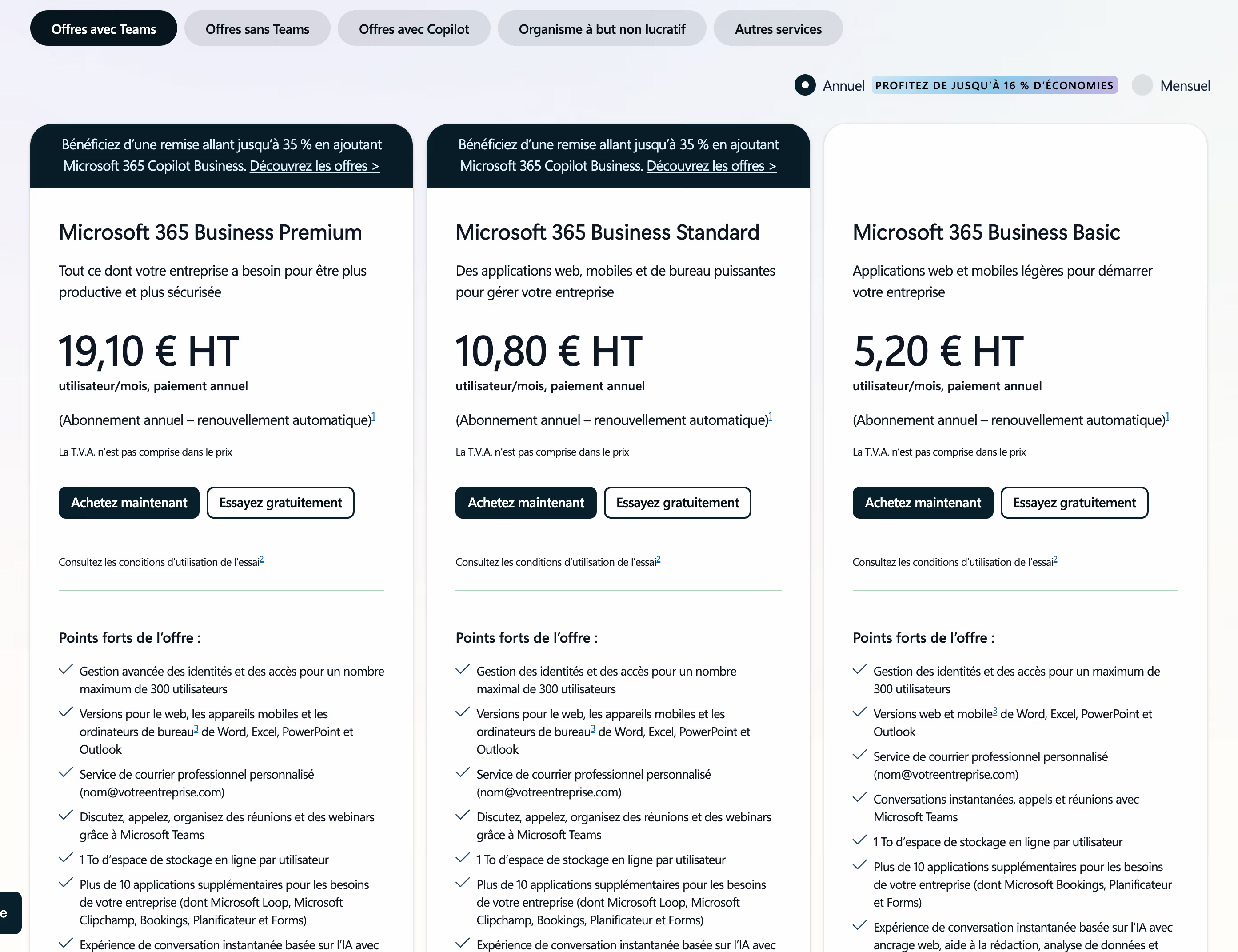
- Business Basic (€5.20/user/month): web versions of Office, Teams, OneDrive (1 TB) and Exchange apps. No desktop apps.
- Business Standard (€10.80/user/month): desktop Office apps, Teams, OneDrive, SharePoint and advanced collaboration tools.
- Business Premium (€19.10/user/month): all Standard + Intune, Azure AD Premium, Microsoft Defender and advanced security.
- Copilot for Microsoft 365: $21/user/month (Business) or $30/user/month (Enterprise) add-on for full AI in apps.
The Business Standard plan remains the best compromise for most SMEs, but the total cost increases rapidly if Copilot AI is a priority need.
We-R reviews on Microsoft 365
Microsoft 365 remains essential for two specific cases: organizations already in the Windows/Office ecosystem, and those that have strong security and compliance needs.
For a digit-first agency or startup, Google Workspace will generally be more fluid and less expensive. But for an SME that relies daily on Excel or Teams as a communication hub, Microsoft 365 remains the most solid choice.
- Manage complex Excel files (dashboards, financial reporting, macros) without losing functionality.
- Deploy a secure environment with device management (Intune) and advanced authentication for hybrid teams.
- Centralize communication, video calls, and file sharing in Teams for teams used to the Microsoft environment.
However, be careful: the cost can become high if you add Copilot and security add-ons, where Google Workspace integrates Gemini at no additional cost.
Microsoft 365 is the best choice if you are already in the Office ecosystem or if enterprise security and the power of Excel are non-negotiable priorities.
Alternatives and tools similar to Microsoft 365
Two suites are positioned directly opposite Microsoft 365 in the collaborative work environments market.
- Google Workspace : easier to manage, with true native real-time collaboration and Gemini AI included, ideal for digit-first teams without dependence on Office desktop apps.
- Zoho Workplace : a very affordable alternative for small structures that want a complete suite without engaging in the Microsoft or Google ecosystem.
Compared to Google Workspace, Microsoft 365 stands out for the power of its desktop apps, its enterprise security and its deep integration into the Windows ecosystem.