What is Canva?
Canva is an online graphic design platform that allows anyone without a design background to create professional visuals based on ready-to-use templates.
Presentations, social media posts, flyers, brochures, brochures, brochures, videos, dashboards... the library of formats and templates is the largest on the market, with more than 250,000 templates available.
Since 2024, Canva has integrated Magic Studio (its AI suite) directly into all of its plans. In April 2026, Canva AI 2.0 was launched, positioning Canva as a serious player in generative AI applied to design.
Canva democratized design: you don't need to know how to use Photoshop or Illustrator to produce presentable visuals that are consistent with your brand.
Key features for B2B teams
- 250,000+ templates organized by format and sector (presentations, social networks, documents, videos, emailings, simple sites...).
- Brand Kit: store colors, fonts, logos, and brand elements to apply them to all team visuals in one click.
- Magic Studio (AI): image generation (Dream Lab), AI writing (Magic Write), deleting elements (Magic Eraser), visual expansion (Magic Expand), and translation into 150+ languages (Magic Switch).
- Magic Design: automatic generation of a complete layout from a prompt or an uploaded file.
- Real-time collaboration: multiple team members edit, comment, and validate the same design simultaneously.
- Approval workflows (Teams/Enterprise): integrated validation circuit before publication, ideal for teams with a brand control process.
The Canva Brand Kit is the real asset for B2B teams, it guarantees the visual consistency of all product visuals, regardless of who creates them.
For whom and in what contexts?
Canva is the reference tool for marketing teams, community managers, sales representatives and any profile that needs to produce visuals regularly without having a background design.
It is also increasingly used in SMEs to replace recurring requests to the agency on standardized formats (Linkedin post, internal presentation, commercial one-pager).
- Marketing teams that produce social media visuals, newsletters and customer presentations independently.
- Sales people who personalize pitch decks or one-pagers without soliciting the designer each time.
- Directors and founders who want to quickly produce communication materials without going through an agency.
Canva is the right tool when the objective is to produce quickly and in volume (posts, presentations, docs) with maintained brand consistency without being a designer.
Canva Price
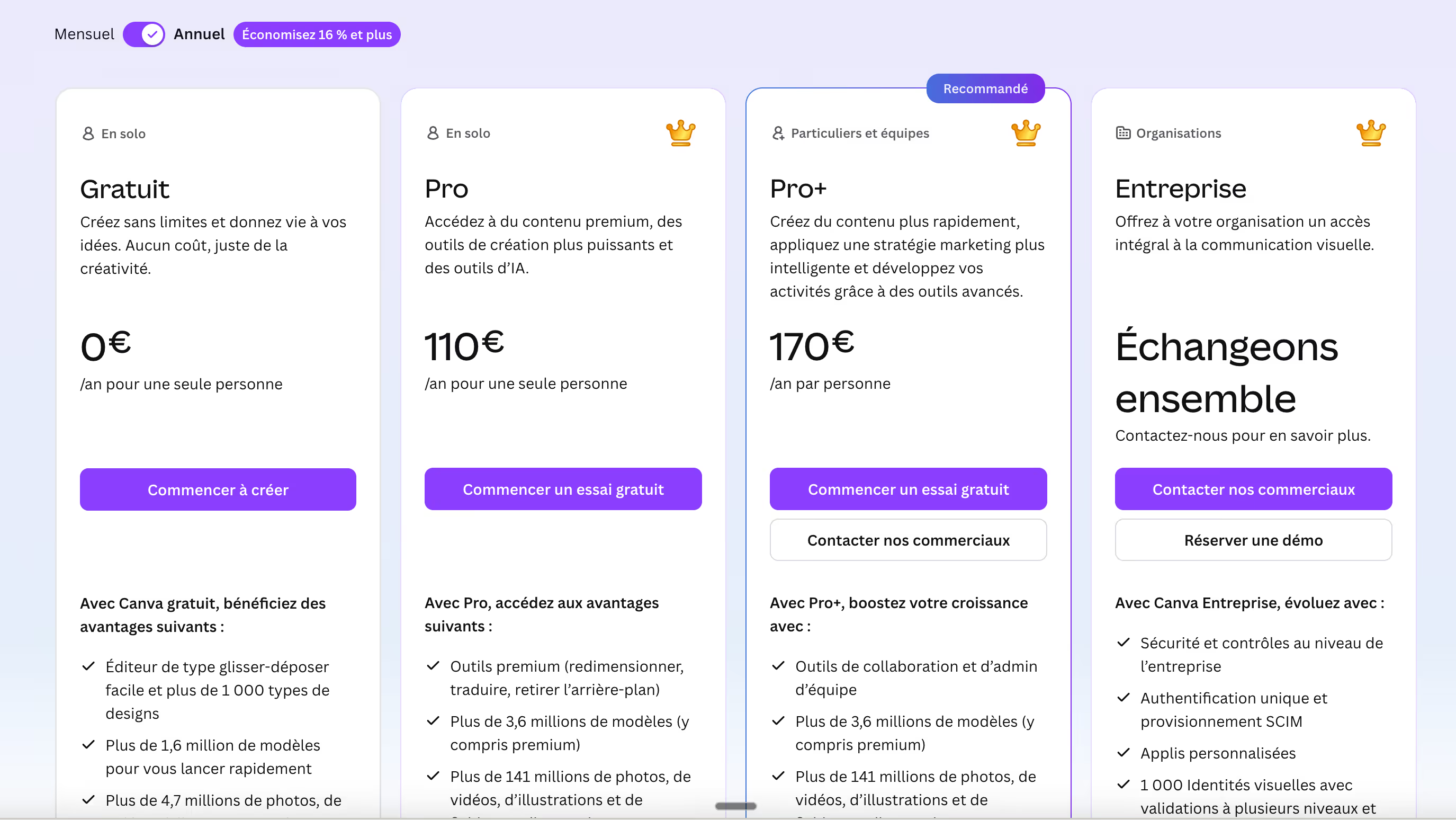
Canva offers 4 plans, with an increase in range based on the volume of AI use, team features and admin controls. The free plan is generous for individual use, but the Brand Kit and advanced AI automations require a paid plan.
- Free plan: basic templates, 5 GB of storage, limited AI credits (25 Magic Write generations/month, ~50 AI images). Sufficient for personal use
- Pro Plan ($15/month): Brand Kit, 1 TB of storage, 500 AI credits/month, all premium templates and access to stock content.
- Teams plan ($10/user/month, minimum 3 users): Shared Brand Kits, approval workflows, rights management, and team collaboration.
- Enterprise plan: custom pricing, SSO, advanced controls, dedicated support and security integrations.
For a team of 3 to 10 people, the Teams plan at $10/user/month is often the best investment: the shared Brand Kit alone saves hours every month.
We-R reviews on Canva
Canva is a great tool in its category. It solves a real problem: allowing non-design teams to produce coherent visuals independently, without soliciting a designer for each post or each slide.
But like any template-based tool, Canva has limits when you want to deviate from them. Canva designs look the same. Visual differentiation is hard to achieve when everyone uses the same models. And for high-stakes deliverables (investor pitch, brand redesign, website), it will never replace a designer who masters Figma.
- Standardize the production of social media content, newsletters and internal presentations with a shared Brand Kit.
- Delegate the creation of recurring visuals to non-designer profiles within the team, with brand safeguards.
- Quickly produce the first drafts of presentations or commercial materials before involving a designer for finalization.
Canva is the best tool to put a non-designer team in visual autonomy, provided they accept their creative limits and do not use it for visuals with high brand value.
Alternatives and tools similar to Canva
Several tools are positioned in the field of design that are accessible to non-designers, with different approaches.
- Claude Design : a prompt first approach without a template, more powerful for exploring ideas, less predictable and controllable than Canva for standardized formats.
- Figma : the professional reference for designers, with advanced collaboration and much superior production tools, but a much longer learning curve.
- v0 by Vercel : generates UI interfaces in code from prompts, more suitable for developers than for marketing profiles.
Compared to Claude Design, Canva stands out for its predictability and its template library: we know what we get, which makes it the ideal tool for producing at volume.